Mastering Your Digital First Impression: A Guide to Professional YouTube and LinkedIn Banner Design
In the rapidly evolving landscape of digital media, your visual identity is often the first handshake you offer to a potential follower, client, or employer. Whether you are building a personal brand on LinkedIn or launching a content empire on YouTube, the quality of your graphical assets speaks volumes before a single word is read or watched. At the heart of this visual strategy lie two critical components: the YouTube channel cover art and the LinkedIn header social media banner. Understanding how to leverage professional design templates for these spaces is not merely an aesthetic choice; it is a strategic business decision.
The Strategic Importance of High-Resolution Visuals
Many creators and professionals underestimate the power of a well-crafted banner. It serves as the digital billboard for your brand. On YouTube, the banner is the backdrop for your channel homepage, framing your profile picture and providing immediate context about your content niche. On LinkedIn, the header image sits prominently above your professional summary, offering a unique opportunity to showcase your industry expertise, company culture, or personal value proposition.
When these elements are pixelated, poorly aligned, or generic, they signal a lack of attention to detail. Conversely, a crisp, 300 DPI resolution image conveys professionalism, credibility, and authority. This is where the technical specifications of your design files become paramount. Utilizing High Resolution assets ensures that your branding looks sharp on everything from a small smartphone screen to a massive 4K monitor.
Why Template Files Matter for Consistency
Creating these visuals from scratch can be daunting for those without extensive graphic design experience. This is where fully editable AI templates become invaluable resources. An AI file, typically associated with Adobe Illustrator, is a vector-based format. Unlike raster images (like JPEGs or PNGs) which can lose quality when resized, vector graphics maintain their clarity at any scale. This flexibility is crucial for social media platforms that often change their display requirements or crop images differently across devices.
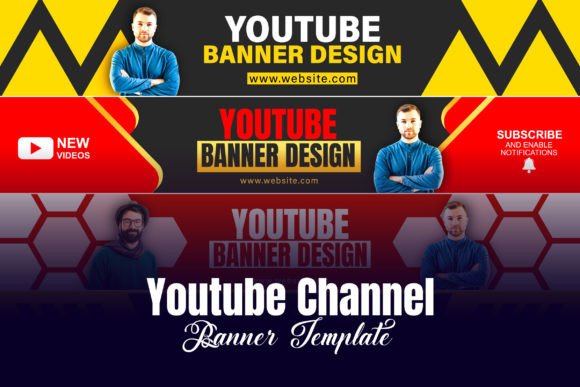
By using a Professional YouTube channel cover art design template, you are not just saving time; you are ensuring structural integrity. These templates come pre-configured with safe zones—areas where text and logos will remain visible regardless of how the platform crops the image on different devices. This eliminates the guesswork and prevents the common embarrassment of having your headline cut off on mobile views.
Deconstructing the Technical Specifications
To truly optimize your digital presence, it is helpful to understand the specific file details mentioned in professional design packages. Let us break down what these terms mean for your final output.
- Ai Files: As mentioned, these are vector files. They allow you to edit every element—text, shapes, colors—independently. This is ideal for customization.
- High Resolution: This refers to the density of pixels or vectors. High resolution ensures that edges are smooth and text is legible.
- 300 DPI Resolution: DPI stands for Dots Per Inch. While screens typically display at 72 DPI, designing at 300 DPI provides a buffer of quality. It ensures that if you ever decide to print your banner for merchandise or promotional materials, it will look pristine.
- RGB Color: Screens use the Red, Green, Blue (RGB) color model to display images. Designing in RGB ensures that the colors you see on your monitor are exactly what your audience sees online, avoiding the dullness that can occur when converting from CMYK (print) colors.
Practical Applications in Modern Business and Creativity
The utility of these design assets extends beyond mere decoration. In modern work and business environments, visual consistency builds trust. Consider a consultant who uses a LinkedIn header social media banner template that aligns perfectly with their website’s color palette and typography. This cohesion reinforces brand recognition. When a potential client moves from LinkedIn to the consultant’s portfolio site, the seamless visual transition reduces cognitive friction and enhances perceived reliability.
For content creators, the YouTube Banner is a vital tool for audience retention. A well-designed banner clearly states what the channel is about. For example, a cooking channel might use vibrant food photography and bold typography to announce new recipe videos every Tuesday. This clarity helps viewers decide instantly if the content matches their interests, reducing bounce rates and increasing subscription likelihood.
Common Misunderstandings About Social Media Graphics
One prevalent misconception is that "bigger is always better." Some users upload massive image files without optimizing them, leading to slow loading times. While High Resolution is essential, it must be balanced with file size optimization for web performance. Another misunderstanding is that templates limit creativity. In reality, a Fully editable AI template is a starting point, not a constraint. It provides a professional structure that you can manipulate to reflect your unique personality.
Furthermore, many believe that static banners are sufficient for all platforms. However, with the rise of dynamic content, some creators are exploring subtle animations or regularly updating their headers to reflect current campaigns or seasons. Having an editable source file makes these updates quick and efficient.
How to Choose and Customize Your Template
Selecting the right template requires a clear understanding of your brand identity. Ask yourself: What emotion do I want to evoke? Is my brand playful and energetic, or serious and corporate? The answer will guide your choice of colors, fonts, and imagery within the template.
- Identify Your Core Message: Before opening the AI file, write down the one sentence you want visitors to understand about you or your business.
- Check the Safe Zones: Ensure that your critical information falls within the central safe area of the template to avoid cropping issues on mobile devices.
- Maintain Contrast: Use the RGB Color model to ensure your text stands out against the background. High contrast improves readability and accessibility.
- Keep It Simple: Cluttered banners can overwhelm viewers. Use negative space effectively to draw attention to your key message.
The Role of Design in Digital Literacy
Understanding how to manage and customize these digital assets is a form of modern digital literacy. It empowers individuals to take control of their online narrative. In education, students can use these skills to create professional portfolios. In technology, developers can use branded banners to enhance their GitHub or technical blog profiles. In daily activities, even casual users benefit from understanding how visual presentation affects perception.
Moreover, the availability of Professional YouTube channel cover art design resources democratizes high-quality design. You no longer need to hire an expensive agency to achieve a polished look. With the right tools and a bit of knowledge, anyone can produce graphics that rival those of major brands.
Conclusion: Elevating Your Online Presence
Your YouTube Banner and LinkedIn header are more than just decorative elements; they are foundational components of your digital identity. By utilizing fully editable AI templates with 300 DPI Resolution and RGB Color accuracy, you ensure that your brand is represented with the highest level of professionalism. These tools provide the flexibility to adapt to changing trends while maintaining a consistent and credible image.
Whether you are a seasoned marketer or a beginner just starting your journey, investing time in understanding and optimizing these visual assets yields significant returns. It enhances engagement, builds trust, and sets you apart in a crowded digital marketplace. Embrace the power of professional design, and let your visuals tell your story with clarity and impact.