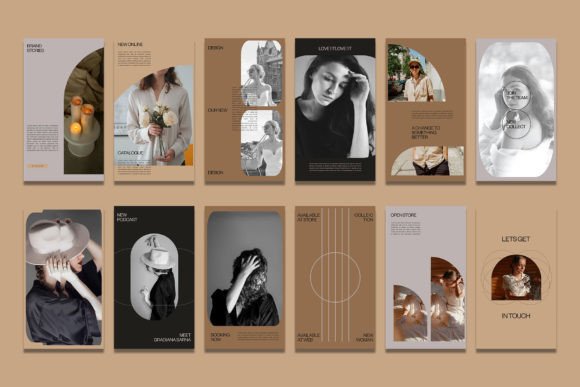
Mastering Visual Serenity: A Guide to the Calm Fashion Instagram Photoshop Template
In the saturated landscape of social media, where every scroll brings a barrage of neon colors and aggressive typography, standing out often means doing less. The aesthetic of "calm fashion" has emerged not just as a trend, but as a necessary counter-movement to digital noise. For designers, influencers, and brand managers, capturing this essence requires more than just a good camera; it demands a workflow that prioritizes efficiency without sacrificing artistic integrity. This is where a specialized Calm Fashion Instagram Photoshop template becomes an indispensable asset.
These templates are designed to bridge the gap between high-end editorial design and the rapid-fire demands of daily content creation. By leveraging pre-built structures, users can maintain a cohesive visual identity that speaks to tranquility, elegance, and minimalism. The core value lies in the balance between automation and customization, allowing creators to focus on the mood of their imagery rather than the mechanics of layout.
The Architecture of Simplicity
At its heart, a professional-grade PSD feed story template is built on a foundation of flexibility. When you open a file designed for calm fashion aesthetics, you are not looking at a static image. You are looking at a dynamic system. The most critical feature here is the use of Smart Objects. This technology is what transforms a rigid design into a versatile tool.
For those new to advanced Photoshop workflows, Smart Objects might seem intimidating, but they are actually the key to ease of use. They allow you to replace placeholder images with your own photography while preserving all the effects, filters, and transformations applied to the original layer. This means if the template designer added a subtle grain, a soft vignette, or a specific color grade to evoke a serene atmosphere, your image will automatically inherit these qualities. You do not need to manually adjust levels or curves for every single post.
The process is remarkably straightforward. To update the visual content, you simply locate the image layer within the group. By double-clicking on the layer icon, a new window opens containing the placeholder image. You then paste or place your own photograph into this window. Once you save this sub-file using the standard shortcut—CTRL S on Windows or Command S on Mac—the main document updates instantly. Your new image snaps into place, perfectly aligned and styled according to the template’s design logic. This non-destructive editing method ensures that you can experiment with different photos without ever risking the integrity of the original layout.
Technical Precision for Digital Clarity
While aesthetics drive engagement, technical specifications ensure quality. A common mistake among amateur designers is neglecting the resolution and color profile of their social media assets. A high-quality Calm Fashion Instagram Photoshop template addresses this by adhering to industry standards right out of the box.
Typically, these files are set to 300 DPI (dots per inch). While screens generally display at 72 PPI, starting with a higher resolution provides a safety net. It allows for cropping, zooming, or even repurposing the design for print materials like lookbooks or business cards without losing sharpness. Furthermore, the color mode is set to RGB, which is essential for any content destined for digital screens. RGB ensures that the muted tones, pastel hues, and earthy neutrals characteristic of calm fashion appear vibrant and accurate on smartphones and monitors, avoiding the dullness that can occur when converting from CMYK print profiles.
Versatility in dimensions is another hallmark of a robust template pack. Modern social media strategies require content across multiple formats. A comprehensive package will include files sized at 1080 x 1080 pixels for standard square feed posts, ensuring compatibility with the classic Instagram grid. Simultaneously, it will provide canvases sized at 1920 x 1080 pixels or vertical variations suitable for Stories and Reels covers. Having both aspect ratios available in a unified design language allows for a seamless brand experience. A follower moving from your main feed to your stories should feel like they are stepping deeper into the same curated world, not jumping between disjointed visual styles.
Customization Beyond the Image
Visuals are only half the story. In calm fashion marketing, typography plays a pivotal role in conveying tone. The font choice, spacing, and hierarchy must reflect the same serenity found in the photography. This is why editable text layers are a non-negotiable feature in any premium PSD template.
With full text editability, users can utilize the Text Tool to modify headlines, captions, dates, or promotional details. Whether you are announcing a new collection drop, sharing a mindfulness quote, or detailing sustainable fabric sources, the ability to change text instantly is crucial. More importantly, because the text layers are preserved as live type, you can adjust the font family, size, leading, and tracking to match your specific brand guidelines. If the default serif font feels too traditional, you can swap it for a clean sans-serif with a few clicks, and the layout will adapt accordingly.
This level of control empowers brands to maintain consistency while adapting to different campaigns. For instance, a summer collection might utilize lighter, airier text spacing, while a winter lineup could benefit from bolder, more grounded typography. The template provides the structure, but the user dictates the voice.
Integrating into Modern Workflows
The true benefit of using a specialized Calm Fashion Instagram Photoshop template is seen in the workflow optimization. Content creators often face the pressure of producing daily posts. Building a complex layout from scratch for every single image is unsustainable and leads to burnout. By adopting a template-based approach, you create a repeatable system.
Consider a fashion influencer who needs to post three times a week. Instead of spending hours aligning elements and choosing filters for each post, they can batch-process their work. They can select five photos from a recent shoot, open the Smart Object for each corresponding template slot, insert the images, save, and then tweak the text overlays. What used to take four hours can now be accomplished in forty-five minutes. This efficiency does not come at the cost of quality; rather, it ensures that every post meets a high standard of design excellence because the foundational work was done by a professional designer.
Moreover, these templates serve as an educational tool. By dissecting the layer structure of a well-made PSD, novice designers can learn how professionals organize their files. Observing how groups are named, how adjustment layers are masked, and how smart filters are applied offers valuable insights into best practices for digital design. It demystifies the process of creating polished, magazine-quality graphics for social platforms.
Choosing the Right Aesthetic Fit
Not all "calm" templates are created equal. When selecting a resource, it is important to look beyond the preview images. Consider the underlying mood. Does the template use enough negative space? Calm fashion relies heavily on breathing room within the design. Overcrowded layouts contradict the very ethos of the style. Look for templates that prioritize minimalism, allowing the product or the model to be the focal point.
Additionally, check for versatility in color palettes. While many calm fashion templates lean towards beige, cream, and soft gray, the best ones offer neutral backgrounds that can accommodate a wider range of clothing colors. If a template has a strong colored overlay, it might clash with certain garments. Neutral bases provide the most flexibility for diverse fashion items.
Ultimately, the goal is to create a digital presence that feels intentional and soothing. By utilizing a high-quality, easy-to-use Photoshop template with Smart Objects, editable text, and proper technical specifications, creators can elevate their brand perception. It turns the mundane task of posting into an act of curation, ensuring that every pixel contributes to a narrative of elegance and ease. In a noisy digital world, providing a moment of visual calm is not just a stylistic choice; it is a strategic advantage.